Add Person To Photo
Add missing people to your photos with realistic lighting and perspective, making them appear as if they were always there. Ideal for reunions, travel memories, or memorial keepsakes, this service offers free use with options for paid upgrades.
Add Person To Photo — official website
Imagine you’re tasked with organizing a family reunion photo album, but a key family member couldn’t make it to the event. The absence leaves a gaping hole in what would otherwise be a cherished memory. Or perhaps you’re a photographer needing to complete a group photo without the hassle of rescheduling a shoot. This is where “Add Person To Photo” steps in, allowing you to seamlessly add the missing individual with the right lighting and perspective. Whether for personal keepsakes or professional projects, this tool aims to recreate moments that feel complete and authentic.
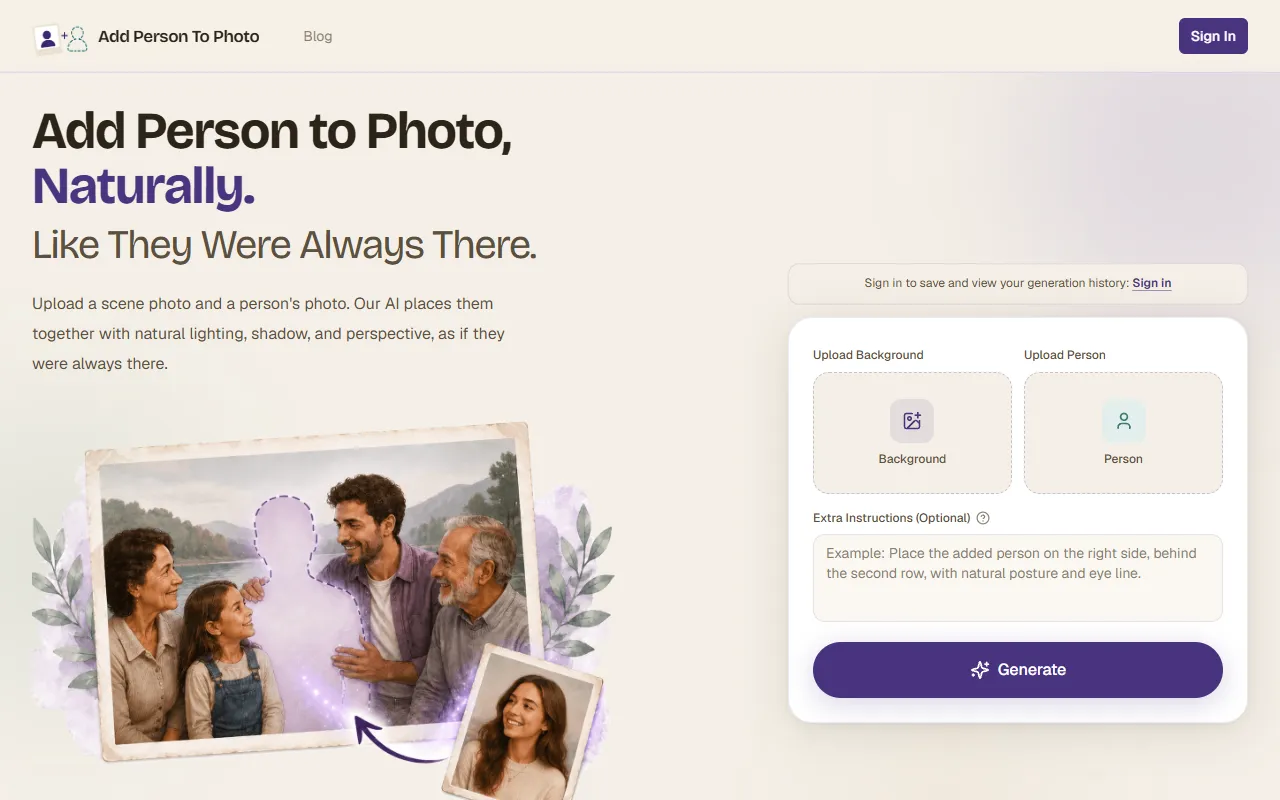
“Add Person To Photo” excels in the workflow of compositing a person into a scene naturally. To start, you upload a background photo that lacks a person, such as a family gathering or a scenic travel shot. Next, you add a clear portrait of the missing individual. The AI analyzes elements like face, skin tone, and body proportion to blend them seamlessly into the scene. Within two minutes, you receive an HD composite where lighting, shadows, and perspective match perfectly. This process is straightforward and doesn’t require prior editing experience, making it accessible for anyone looking to restore or enhance their images.
Key Features
- Natural Lighting and Perspective — Ensures that the added person looks like they were always part of the scene, crucial for authenticity.
- Easy Upload Process — Accepts a range of formats like JPG, PNG, and HEIC, up to 4K resolution, making it versatile for various needs.
- Extra Instructions — Allows users to specify placement or interactions, adding a customized touch to the final image.
- Quick Turnaround — Provides a final composite in under two minutes, saving valuable time.
Pros & Cons
- ✓ Natural blending of lighting and perspective as highlighted in example scenarios
- ✓ Simple process requiring no editing experience, as described in the homepage copy
- ✓ Fast processing time for generating final images
- ✗ The website doesn’t specify the pricing details, which could be a barrier for some users
- ✗ Limited information on handling complex scenes with multiple people and varying depths
One scenario where “Add Person To Photo” might fall short is in handling highly complex group photos with intricate interactions and depth layers. Professional photographers or designers needing precise control over every element may find the tool’s capabilities limited for intricate compositions. The tool doesn’t offer explicit features for advanced customization or manual adjustments, which could frustrate users who require more granular control over the editing process.
When comparing “Add Person To Photo” to alternatives like Adobe Photoshop or GIMP, the former stands out for its simplicity and speed. Photoshop offers advanced editing capabilities and customization options that are unmatched but come with a steeper learning curve and a higher price point. “Add Person To Photo” is ideal for users who want quick results without diving into detailed editing, while Photoshop is better suited for professionals who need complete control over every aspect of their images.
Best For
This tool is best for individuals or small teams looking to create personal keepsakes or quick edits for social media without the need for advanced editing skills. The simplicity of the process makes it suitable for casual users who want to enhance personal photos quickly. The pricing model isn’t specified, so potential users might need to contact the service for detailed information.
“Add Person To Photo” is a useful tool for those who want to recreate complete moments in their personal or professional photo collections, quickly and with minimal effort. It’s particularly valuable for users who prioritize ease of use and speed over detailed customization. For anyone looking to effortlessly fill in the gaps in their cherished memories, this tool is worth a try.
This review is based on publicly available information from the tool's official website and is written independently by the theWebrary editorial team. We do not accept payment for review content.
Share
Screenshots

Tool Overview
Category
AI Image GenerationPricing
Freemium
Official Website
https://add-person-to-photo.com/Rating
Latest Featured


Browse More Tools
View all
Time Overlay
AI Image GenerationGenerate transparent countdown timer overlays for video editing projects with Time Overlay. This tool allows users to customize duration, style, and position before exporting in formats like PNG or WebM. It’s available for free, making it accessible for content creators and editors.

Yume Comic
AI Image GenerationCreate manga, webtoons, and cartoon panels from text or images in just seconds. Ideal for storytellers without drawing skills, Yume Comic enables users to bring their ideas to life with a free tier and optional paid upgrades.

Hubfluence
AI MarketingAutomates outreach and management for TikTok Shop brands and agencies by connecting them with creators to drive sales. Users can access a database of over 4 million creators to find the best partnerships. Free to start with options for paid upgrades.

Combos AI: Turn Text into Gmae with AI Free Online – No coding & No Sign-up
AI ProductivityTurn text into games effortlessly with Combos, an AI-driven platform for game development. Designed for creators of all skill levels, it requires no coding or sign-up, making game creation accessible and free.

Instagram Email Scraper
AI Customer SupportExtracts emails and phone numbers from Instagram followers and those followed, exporting the data to Excel or CSV formats with a single click. Ideal for businesses looking to enhance their outreach efforts. Free to use with options for paid upgrades.

CustomTattoo AI
AI Image GenerationGenerate unique tattoo designs and visualize them on your own skin before getting inked. Ideal for anyone considering a tattoo, it offers 3 free credits to start, with additional paid upgrades available.
Get Your AI Tool
In Front of Thousands
Join hundreds of AI tools already featured on theWebrary. Get priority placement, a dedicated listing page, and reach an audience actively searching for AI tools.
1 Month
$5
$6
3 Months
$10
Save 50%
12 Months
$20
Save 75%