Floor Plan Maker
Create detailed 2D and 3D floor plans effortlessly for home design, renovations, and room planning. Ideal for designers and DIY enthusiasts, this free online tool simplifies layout customization and visualization.
Floor Plan Maker — official website
Imagine you’re a homeowner about to embark on a renovation project. You’ve got some ideas in mind, but visualizing them is proving difficult. Sketching by hand isn’t cutting it, and CAD software feels overwhelming. You need a straightforward solution that allows you to create and modify floor plans quickly, enabling you to see potential layouts before committing to construction. This is where an intuitive online tool for generating and refining floor plans, like Floor Plan Maker, can make a significant difference in clarifying your vision and ensuring a smoother renovation process.
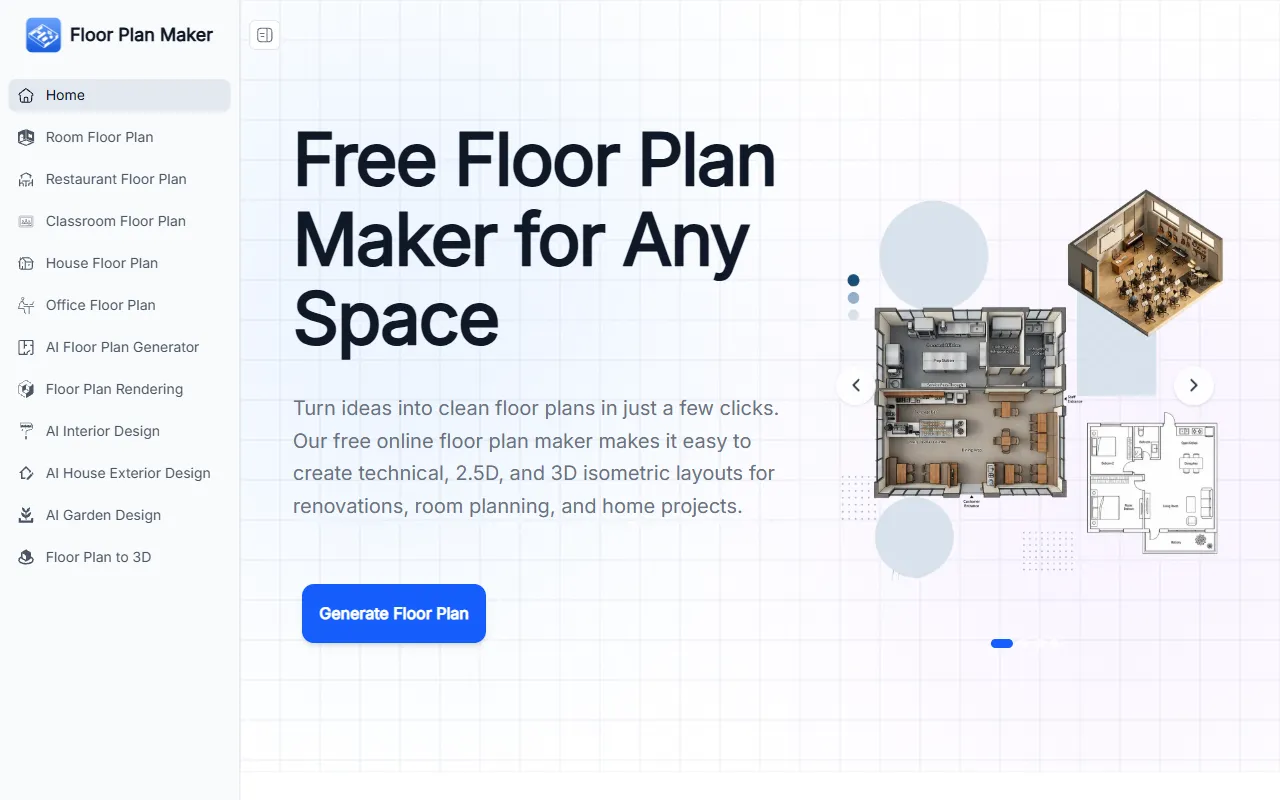
Floor Plan Maker shines in its ability to simplify the floor planning process for users without design experience. You start by entering your room preferences—such as the number of bedrooms and bathrooms—and choose from various styles like Technical, 2.5D, or 3D Isometric views. The AI then generates a layout in seconds, allowing you to refine it as needed. This feature is ideal for those who need to visualize different room arrangements quickly, making it particularly useful for home renovation projects where seeing multiple layout options in a short time is essential.
Key Features
- AI Floor Plan Generation — Allows users to create layouts effortlessly by entering their room preferences and letting AI handle the rest.
- Multiple Floor Plan Styles — Offers Technical, 2.5D, and 3D Isometric views, catering to different presentation needs.
- Adjustable Space Size — Enables fine-tuning of dimensions in metric or imperial units to match real-world spaces accurately.
- Flexible Room Setup — Customizes various room types to fit diverse planning needs and home layouts.
Pros & Cons
- ✓ Completely free, making it accessible for personal projects without any cost barriers.
- ✓ No design skills needed, making it user-friendly for homeowners and DIY enthusiasts.
- ✓ Fast AI generation saves time compared to traditional design software.
- ✗ Limited to online use; no offline version is available.
- ✗ Lacks advanced customization for professional architects who need detailed design control.
For professional architects or interior designers who require advanced design features and intricate detailing, Floor Plan Maker might not meet all their needs. The tool is tailored more towards users seeking a quick and easy way to visualize their space without delving into complex design software. In scenarios where a more sophisticated design tool is necessary, users might find Floor Plan Maker’s capabilities limited, particularly in offering detailed customization options for larger commercial projects.
If you’re considering other tools, SketchUp and RoomSketcher are viable alternatives. SketchUp offers more advanced 3D modeling and is suitable for users who need detailed architectural designs. RoomSketcher, on the other hand, provides a more intuitive interface similar to Floor Plan Maker but includes features like virtual tours. Floor Plan Maker is the ideal choice if you’re looking for a free, easy-to-use tool for basic home projects, while SketchUp or RoomSketcher might be better for professional or more intricate design needs.
Best For
Floor Plan Maker is best for homeowners, DIY enthusiasts, and real estate professionals who need a simple and free tool to create floor plans without design experience. It’s especially suited for those working on personal renovation projects or small-scale planning tasks where quick visualization is key. The tool’s free pricing model allows users to experiment with different layouts without financial commitment.
Floor Plan Maker offers a straightforward and cost-effective solution for creating floor plans without needing design expertise. It’s particularly beneficial for homeowners and DIY enthusiasts looking to plan renovations or visualize small living spaces. For users who value simplicity and speed over advanced features, Floor Plan Maker is worth considering as a go-to tool for generating and refining basic floor layouts.
This review is based on publicly available information from the tool's official website and is written independently by the theWebrary editorial team. We do not accept payment for review content.
Share
Screenshots

Tool Overview
Latest Featured


Browse More Tools
View all
Time Overlay
AI Image GenerationGenerate transparent countdown timer overlays for video editing projects with Time Overlay. This tool allows users to customize duration, style, and position before exporting in formats like PNG or WebM. It’s available for free, making it accessible for content creators and editors.

Yume Comic
AI Image GenerationCreate manga, webtoons, and cartoon panels from text or images in just seconds. Ideal for storytellers without drawing skills, Yume Comic enables users to bring their ideas to life with a free tier and optional paid upgrades.

Hubfluence
AI MarketingAutomates outreach and management for TikTok Shop brands and agencies by connecting them with creators to drive sales. Users can access a database of over 4 million creators to find the best partnerships. Free to start with options for paid upgrades.

Combos AI: Turn Text into Gmae with AI Free Online – No coding & No Sign-up
AI ProductivityTurn text into games effortlessly with Combos, an AI-driven platform for game development. Designed for creators of all skill levels, it requires no coding or sign-up, making game creation accessible and free.

Instagram Email Scraper
AI Customer SupportExtracts emails and phone numbers from Instagram followers and those followed, exporting the data to Excel or CSV formats with a single click. Ideal for businesses looking to enhance their outreach efforts. Free to use with options for paid upgrades.

CustomTattoo AI
AI Image GenerationGenerate unique tattoo designs and visualize them on your own skin before getting inked. Ideal for anyone considering a tattoo, it offers 3 free credits to start, with additional paid upgrades available.
Get Your AI Tool
In Front of Thousands
Join hundreds of AI tools already featured on theWebrary. Get priority placement, a dedicated listing page, and reach an audience actively searching for AI tools.
1 Month
$5
$6
3 Months
$10
Save 50%
12 Months
$20
Save 75%