Hatchr
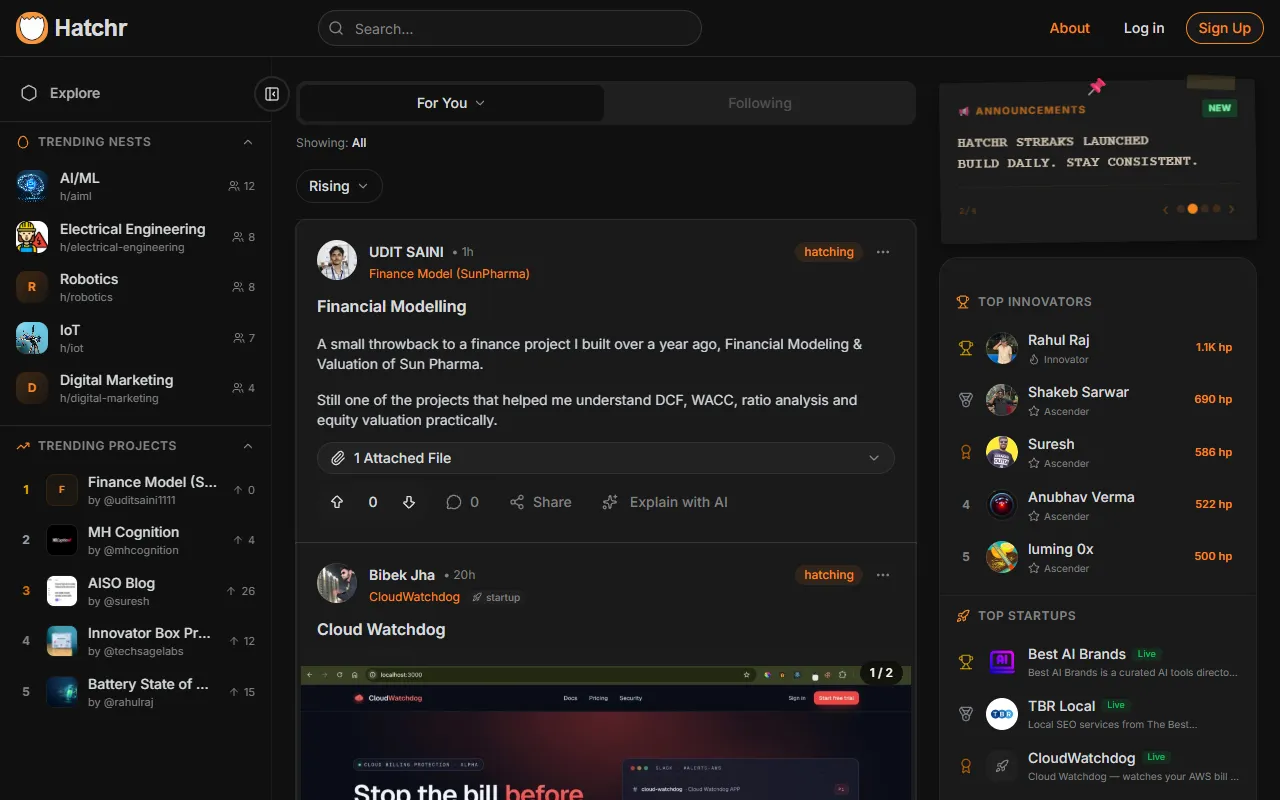
Documents projects publicly to highlight process, progress, and expertise. Designed for builders looking to enhance their career growth through clear project visibility. Free with optional paid upgrades for additional features.
Hatchr — official website
Imagine you’re a developer or a creative professional juggling multiple side projects alongside your main job. You want to showcase your work beyond a static resume, but maintaining a dynamic online portfolio seems daunting. Worse, you’ve just missed a networking opportunity because your project documentation was scattered across different platforms. You’re looking for a centralized space to document your project timelines and share your build journey with others who understand the process. That’s where a tool like Hatchr could potentially come in handy.
Hatchr excels in creating a living portfolio, allowing you to document your projects as real timelines. Based on the tool’s own marketing, you can keep all your work centralized, transforming it from scattered ideas into a cohesive and evolving portfolio. This feature is particularly useful for developers and builders who want to build in public, advertising both their process and progress. As you document your journey from idea to launch, Hatchr allows you to connect with a community that celebrates building. Input your project details, timelines, and milestones, and Hatchr helps you turn that into a visually appealing and organized portfolio.
Key Features
- Living Portfolio — Keep all your work in one place and transform it into an evolving portfolio.
- Document Projects as Timelines — Document your projects from start to finish, showcasing real progress.
- Community Engagement — Share your journey and connect with a community that appreciates the building process.
Pros & Cons
- ✓ Centralized work management — Keep all your projects in one place.
- ✓ Encourages public building — Helps you document and share your progress.
- ✓ Community-focused — Engages users in a community of builders.
- ✗ The website doesn’t specify pricing details — leaves users guessing about costs.
- ✗ Limited information on integrations with other platforms or tools.
Hatchr may not be ideal for users looking for detailed integration with other productivity tools like Trello or Slack, which are crucial for teams that rely on interconnected platforms. The lack of specified pricing also makes it hard for budget-conscious freelancers or startups to assess its cost-effectiveness. If you’re someone who needs a tool to tie in seamlessly with existing workflows, this might be a point of frustration.
For those considering Hatchr, an alternative like Notion offers more versatile project management features and integrations, making it a better choice for teams needing a multipurpose tool. On the other hand, Hatchr’s specialization in creating a public-facing portfolio might appeal more to solo builders seeking community engagement and visibility. If your primary goal is to document and share your building journey, Hatchr’s targeted features could make it more suitable than Notion.
Best For
Hatchr is best suited for solo developers, creators, or startup founders looking to document their project journeys and engage with a community of builders. Its free model with paid upgrades fits well for those who are starting out and want to build a dynamic portfolio without a high initial investment.
Hatchr is a compelling option for those wishing to document their projects publicly while engaging with a community that values the building process. It’s particularly suited for builders who want to keep all their work in one space and turn it into an evolving portfolio. If you’re looking to connect your journey from idea to launch, Hatchr is worth considering.
This review is based on publicly available information from the tool's official website and is written independently by the theWebrary editorial team. We do not accept payment for review content.
Share
Tool Overview
Latest Featured


Browse More Tools
View all
Time Overlay
AI Image GenerationGenerate transparent countdown timer overlays for video editing projects with Time Overlay. This tool allows users to customize duration, style, and position before exporting in formats like PNG or WebM. It’s available for free, making it accessible for content creators and editors.

Yume Comic
AI Image GenerationCreate manga, webtoons, and cartoon panels from text or images in just seconds. Ideal for storytellers without drawing skills, Yume Comic enables users to bring their ideas to life with a free tier and optional paid upgrades.

Hubfluence
AI MarketingAutomates outreach and management for TikTok Shop brands and agencies by connecting them with creators to drive sales. Users can access a database of over 4 million creators to find the best partnerships. Free to start with options for paid upgrades.

Combos AI: Turn Text into Gmae with AI Free Online – No coding & No Sign-up
AI ProductivityTurn text into games effortlessly with Combos, an AI-driven platform for game development. Designed for creators of all skill levels, it requires no coding or sign-up, making game creation accessible and free.

Instagram Email Scraper
AI Customer SupportExtracts emails and phone numbers from Instagram followers and those followed, exporting the data to Excel or CSV formats with a single click. Ideal for businesses looking to enhance their outreach efforts. Free to use with options for paid upgrades.

CustomTattoo AI
AI Image GenerationGenerate unique tattoo designs and visualize them on your own skin before getting inked. Ideal for anyone considering a tattoo, it offers 3 free credits to start, with additional paid upgrades available.
Get Your AI Tool
In Front of Thousands
Join hundreds of AI tools already featured on theWebrary. Get priority placement, a dedicated listing page, and reach an audience actively searching for AI tools.
1 Month
$5
$6
3 Months
$10
Save 50%
12 Months
$20
Save 75%