MarkItDown Online
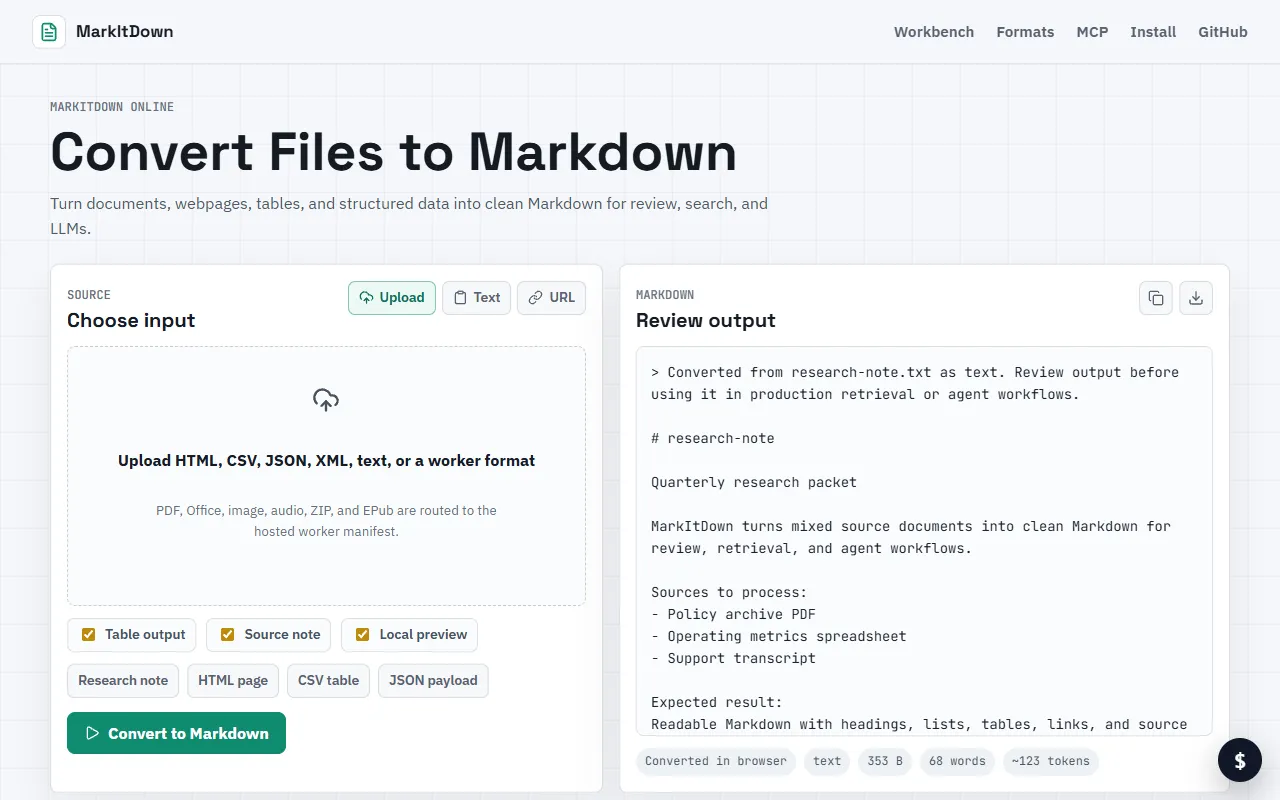
Convert documents, webpages, tables, and structured data into clean Markdown format for easy review and searchability. Ideal for writers and developers looking to streamline content for LLMs and other applications. Paid subscription required.
MarkItDown Online — official website
Imagine you’re a content manager who needs to turn a constant stream of reports, web content, and structured data into Markdown for easier review and integration with AI tools. You’ve missed deadlines before because the tools you used were cumbersome and didn’t handle diverse input formats well. Now, with a backlog of documents to process and a team relying on you, finding an efficient conversion solution is essential. You need a tool that can quickly turn a variety of file types into clean Markdown for seamless integration and review.
MarkItDown Online offers a promising solution for those looking to convert documents, webpages, tables, and structured data into Markdown. Based on the tool’s marketing, its main capability is converting various file types directly into clean Markdown, which is particularly useful for integrating with large language models (LLMs), enhancing document searchability, and reviewing content. This feature allows you to upload a document, such as a PDF or a web page URL, and receive a neatly formatted Markdown file. This process is meant to simplify your workflow by reducing the need for manual reformatting, enabling you to focus on higher-level tasks.
Key Features
- Document Conversion — Converts documents into clean Markdown, making them easier to integrate with other applications.
- Webpage Conversion — Transforms webpage content into Markdown, aiding in content management and editing.
- Structured Data Handling — Converts tables and other structured data into Markdown, helping with data analysis and reporting.
Pros & Cons
- ✓ Converts a wide range of formats into Markdown, making it versatile for different use cases.
- ✓ Directly integrates with LLMs, enhancing the utility of converted documents.
- ✓ Improves document searchability and review processes with clean Markdown output.
- ✗ The website doesn’t specify detailed pricing information, which could be a barrier to potential users.
- ✗ It lacks information on specific limits or quotas for conversion tasks, which might concern high-volume users.
If you’re a high-volume user who needs to convert a large number of files quickly, MarkItDown Online might frustrate you due to unspecified limits or potential quotas. Additionally, if you’re budget-conscious and need transparent pricing details upfront, the lack of specific pricing information could be a significant drawback. Users who need to manage their workflow with clear expectations may find these omissions challenging, particularly when handling complex projects with tight deadlines.
For those considering alternatives, Pandoc is a well-known tool that offers extensive format conversion capabilities, including Markdown. It’s open-source and known for its flexibility, making it ideal for developers or tech-savvy users. On the other hand, MarkItDown Online may appeal more to business professionals and content managers who value simplicity and direct integration with AI tools, despite its lack of open-source adaptability. Choose Pandoc if you require a flexible and customizable solution, while MarkItDown Online is better for those prioritizing ease of use and AI integration.
Best For
MarkItDown Online is best for small to medium-sized teams that frequently need to convert various file types into Markdown for content management and integration with AI tools. The tool’s pricing model, although unspecified, suggests a paid service, which may suit businesses that prioritize results over budget constraints. It’s particularly useful for content managers who need efficient workflows without the complexity of open-source tools.
MarkItDown Online is a valuable tool for professionals who need to convert documents and data into Markdown efficiently. While details about pricing and conversion limits remain unspecified, its capabilities in handling diverse input formats make it a strong choice for content managers and small businesses. MarkItDown Online is worth considering if you seek a straightforward conversion tool that supports AI workflow integration.
This review is based on publicly available information from the tool's official website and is written independently by the theWebrary editorial team. We do not accept payment for review content.
Share
Screenshots


Tool Overview
Latest Featured


Browse More Tools
View all
Time Overlay
AI Image GenerationGenerate transparent countdown timer overlays for video editing projects with Time Overlay. This tool allows users to customize duration, style, and position before exporting in formats like PNG or WebM. It’s available for free, making it accessible for content creators and editors.

Yume Comic
AI Image GenerationCreate manga, webtoons, and cartoon panels from text or images in just seconds. Ideal for storytellers without drawing skills, Yume Comic enables users to bring their ideas to life with a free tier and optional paid upgrades.

Hubfluence
AI MarketingAutomates outreach and management for TikTok Shop brands and agencies by connecting them with creators to drive sales. Users can access a database of over 4 million creators to find the best partnerships. Free to start with options for paid upgrades.

Combos AI: Turn Text into Gmae with AI Free Online – No coding & No Sign-up
AI ProductivityTurn text into games effortlessly with Combos, an AI-driven platform for game development. Designed for creators of all skill levels, it requires no coding or sign-up, making game creation accessible and free.

Instagram Email Scraper
AI Customer SupportExtracts emails and phone numbers from Instagram followers and those followed, exporting the data to Excel or CSV formats with a single click. Ideal for businesses looking to enhance their outreach efforts. Free to use with options for paid upgrades.

CustomTattoo AI
AI Image GenerationGenerate unique tattoo designs and visualize them on your own skin before getting inked. Ideal for anyone considering a tattoo, it offers 3 free credits to start, with additional paid upgrades available.
Get Your AI Tool
In Front of Thousands
Join hundreds of AI tools already featured on theWebrary. Get priority placement, a dedicated listing page, and reach an audience actively searching for AI tools.
1 Month
$5
$6
3 Months
$10
Save 50%
12 Months
$20
Save 75%