OG Image Generator
Generate stunning Open Graph images for social media platforms like Twitter, LinkedIn, and Facebook. With client-side rendering and no data uploads required, developers can easily create and customize images for their projects. Free to use, it offers an accessible solution for enhancing online presence.
OG Image Generator — official website
Imagine you’re the social media manager for a mid-sized tech startup. You’ve got a major product launch coming up, and you need to make sure every online post grabs attention instantly. Your go-to designer is swamped, and there’s no time for bottlenecks. You’re desperate for a quick fix to create engaging social media preview images that will catch eyes on platforms like Twitter and Facebook. That’s when you start looking for a tool that can effortlessly generate Open Graph (OG) images—something that’s fast, requires minimal design skills, and integrates smoothly with your existing workflow.
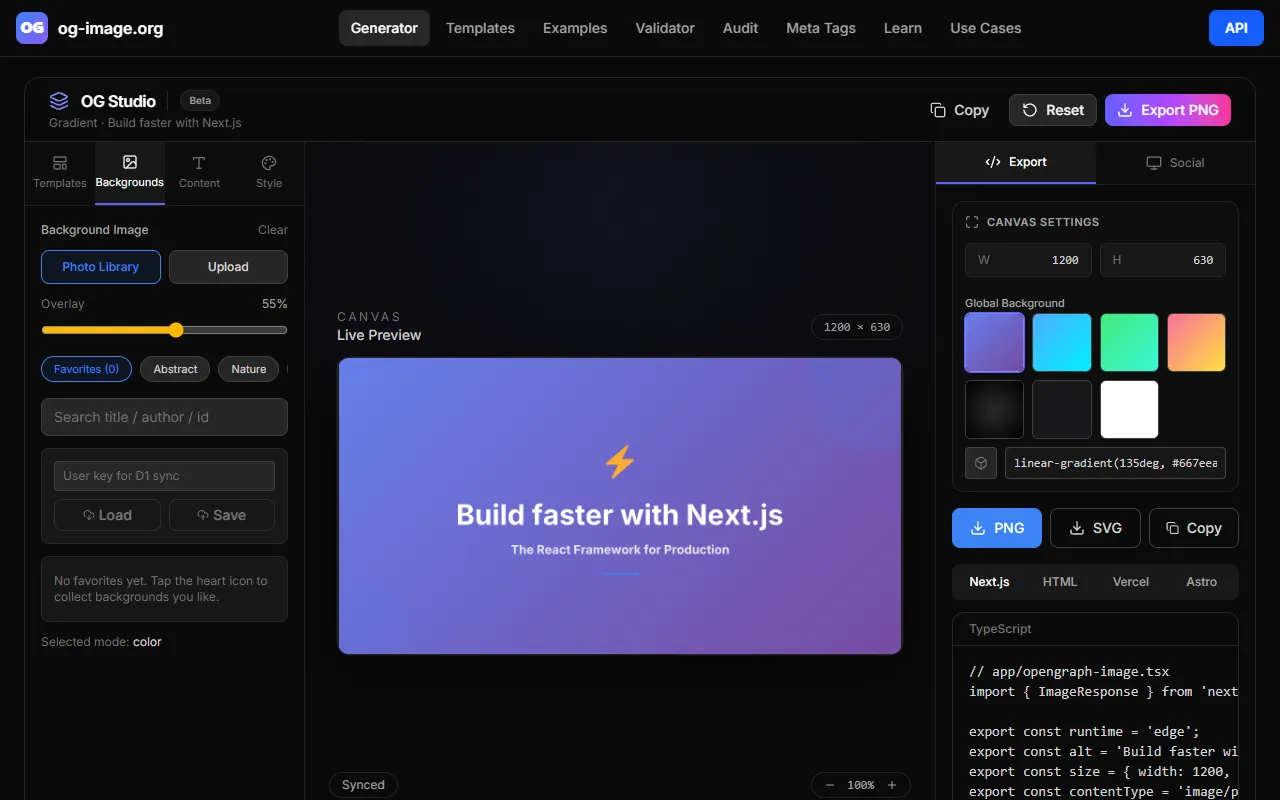
The OG Image Generator excels at producing visually appealing social media preview images quickly. Based on its marketing, this tool is particularly useful for developers and tech-savvy users who need to generate Open Graph images without uploading sensitive data, thanks to its client-side rendering feature. You start by selecting templates or backgrounds, customize them with text and graphics in a live preview, and export the final image in PNG format. Its API-first approach allows for easy integration into existing apps or websites, making it a breeze to automate the creation of consistent visual branding across multiple social media channels.
Key Features
- Client-side rendering — Ensures privacy as no data is uploaded, which is crucial for sensitive content.
- API-first design — Ideal for developers who want to integrate image generation into their applications or websites.
- Live preview — Allows users to see changes in real-time, speeding up the design process.
- Export options — Supports PNG and SVG formats for versatile use across platforms.
Pros & Cons
- ✓ Completely free to use, making it accessible for startups and budget-conscious users.
- ✓ No data upload required ensures privacy and compliance with data protection standards.
- ✓ Easy integration with existing workflows via its API, perfect for automated processes.
- ✗ Limited design capabilities compared to full-featured graphic design tools like Canva or Adobe Spark.
- ✗ Not suitable for non-technical users who may struggle with API integration.
While the OG Image Generator is a robust tool for developers or tech-savvy users, it may not be the best choice for small business owners or social media managers lacking technical expertise. The reliance on client-side rendering and API-first design could be daunting for those who prefer a straightforward drag-and-drop interface. Additionally, if you’re looking for intricate design capabilities, this tool’s simplicity might be a limitation. Users who need a more comprehensive design suite might find it lacking in advanced features like animations or complex layer management.
Comparing OG Image Generator to tools like Canva or Adobe Spark reveals some trade-offs. Canva offers an extensive library of templates and a user-friendly interface, making it ideal for non-developers who want to produce visually appealing content without a learning curve. Adobe Spark provides creative flexibility with more design elements. In contrast, OG Image Generator offers API integration and client-side rendering, which are more suited for developers who need privacy and automation. Choose OG Image Generator if you’re focused on privacy and seamless workflow integration, but consider Canva or Adobe Spark for richer design capabilities.
Best For
The OG Image Generator is ideal for developers or tech-savvy teams that need to create Open Graph images quickly and integrate the process into their existing workflows. It’s perfect for those who prioritize privacy and automation, such as web developers or digital marketers in tech companies. The fact that it’s completely free makes it accessible for startups and budget-conscious users.
OG Image Generator is a valuable tool for developers needing quick and private OG image creation. Its integration capabilities and client-side rendering make it an excellent fit for tech-savvy users who appreciate automation and data privacy. However, those wanting more advanced design features or a simple user interface might look elsewhere. For users with coding knowledge, the tool is a great choice for efficient and secure social media image generation.
This review is based on publicly available information from the tool's official website and is written independently by the theWebrary editorial team. We do not accept payment for review content.
Share
Screenshots

Tool Overview
Latest Featured


Browse More Tools
View all
Time Overlay
AI Image GenerationGenerate transparent countdown timer overlays for video editing projects with Time Overlay. This tool allows users to customize duration, style, and position before exporting in formats like PNG or WebM. It’s available for free, making it accessible for content creators and editors.

Yume Comic
AI Image GenerationCreate manga, webtoons, and cartoon panels from text or images in just seconds. Ideal for storytellers without drawing skills, Yume Comic enables users to bring their ideas to life with a free tier and optional paid upgrades.

Hubfluence
AI MarketingAutomates outreach and management for TikTok Shop brands and agencies by connecting them with creators to drive sales. Users can access a database of over 4 million creators to find the best partnerships. Free to start with options for paid upgrades.

Combos AI: Turn Text into Gmae with AI Free Online – No coding & No Sign-up
AI ProductivityTurn text into games effortlessly with Combos, an AI-driven platform for game development. Designed for creators of all skill levels, it requires no coding or sign-up, making game creation accessible and free.

Instagram Email Scraper
AI Customer SupportExtracts emails and phone numbers from Instagram followers and those followed, exporting the data to Excel or CSV formats with a single click. Ideal for businesses looking to enhance their outreach efforts. Free to use with options for paid upgrades.

CustomTattoo AI
AI Image GenerationGenerate unique tattoo designs and visualize them on your own skin before getting inked. Ideal for anyone considering a tattoo, it offers 3 free credits to start, with additional paid upgrades available.
Get Your AI Tool
In Front of Thousands
Join hundreds of AI tools already featured on theWebrary. Get priority placement, a dedicated listing page, and reach an audience actively searching for AI tools.
1 Month
$5
$6
3 Months
$10
Save 50%
12 Months
$20
Save 75%