retroshelf
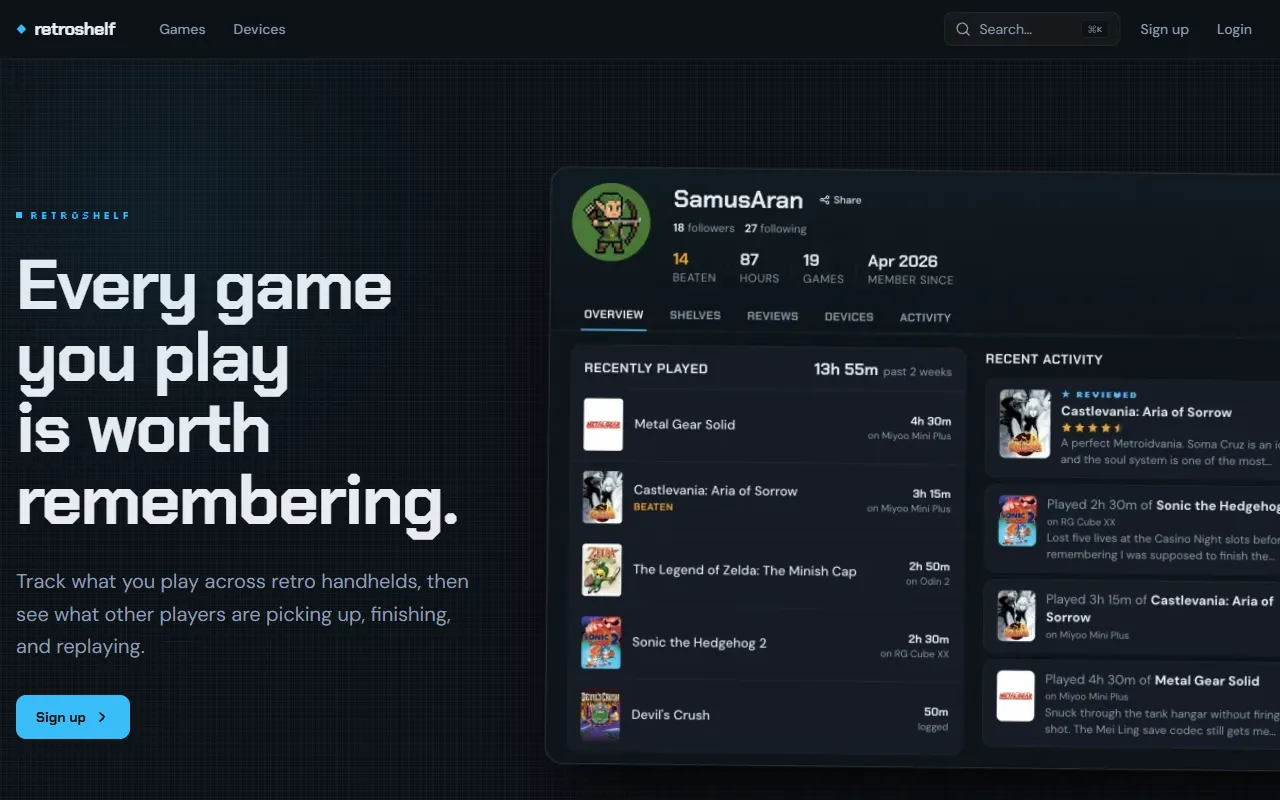
Track retro handheld gaming sessions across devices with retroshelf, automatically logging games and playtime. Designed for handheld gamers, it creates a timeline of gameplay history for easy browsing. Free to use.
retroshelf — official website
Imagine you’re a retro gaming enthusiast with a collection of handheld devices. Keeping track of what games you’ve played across various systems can become a messy endeavor, especially if you’re hopping between devices. You want a seamless way to log your game sessions automatically and see what others in the community are playing. This is where a tool that tracks your retro handheld play, capturing session details and offering insights into gaming trends, would be invaluable. Such a tool would not only organize your gaming history but also connect you with a broader community of handheld gamers.
Retroshelf excels in automatically logging your game sessions. By using a simple plugin that you drop onto your SD card, your handheld gaming sessions are tracked without any manual input. You link your device, and from there, every session is recorded, noting the game, the duration, and the device you used. This information populates your personal “shelf,” allowing you to browse your gaming timeline later. This feature is particularly useful for gamers who frequently switch between devices and want a centralized history of their gameplay.
Key Features
- Automatic Session Logging — Captures your gaming sessions across devices without manual input, keeping your play history organized.
- Device and Game Browsing — Allows you to see what games are popular and what devices are being used by other players.
- Contextual Reviews — Provides star ratings with the context of the device used, offering richer insights than standard reviews.
Pros & Cons
- ✓ Effortless automatic logging of gaming sessions as you play, saving time and effort.
- ✓ Allows browsing and filtering by device and game popularity, making it easier to discover trends.
- ✓ Provides contextual reviews that enhance the value of the feedback by linking it to specific devices.
- ✗ Limited to specific operating systems like muOS and OnionOS, which may not support all devices.
- ✗ The website doesn’t specify if it supports multiplayer or cooperative gameplay tracking, potentially limiting its scope.
Retroshelf might not be the best fit for users who prefer to play modern games or those who use unsupported operating systems. If your handheld doesn’t run on muOS or OnionOS, you may find the tool unusable. Moreover, if your gaming sessions involve multiplayer or games not easily tracked by the plugin, you could encounter limitations in its tracking capabilities. This could frustrate users looking for a comprehensive gaming history across all their devices and game types.
For those considering alternatives, Backloggery is a viable option, offering a broader scope of game tracking across different platforms, not just handhelds. While Retroshelf is tailored for retro handheld enthusiasts, Backloggery might appeal to gamers looking for a more inclusive solution that isn’t limited by device type or operating system. Choose Retroshelf for a more community-focused, handheld-specific experience, while Backloggery might be better for users wanting a wider range of game tracking.
Best For
Retroshelf is ideal for retro gaming enthusiasts who frequently switch between handheld devices running muOS or OnionOS. It’s particularly useful for solo players interested in logging their sessions and connecting with a community of similar gamers. The fact that it’s completely free makes it accessible to any hobbyist or serious collector looking to organize their gaming history.
Retroshelf is a valuable tool for retro gaming aficionados who want to keep a detailed log of their handheld gameplay. It’s especially worth it for those using supported devices and looking to engage with a community sharing similar interests. For anyone fitting this profile, Retroshelf offers an organized and insightful way to track and share your gaming journey. Sign up now to streamline your retro gaming history.
This review is based on publicly available information from the tool's official website and is written independently by the theWebrary editorial team. We do not accept payment for review content.
Share
Screenshots

Tool Overview
Latest Featured


Browse More Tools
View all
Time Overlay
AI Image GenerationGenerate transparent countdown timer overlays for video editing projects with Time Overlay. This tool allows users to customize duration, style, and position before exporting in formats like PNG or WebM. It’s available for free, making it accessible for content creators and editors.

Yume Comic
AI Image GenerationCreate manga, webtoons, and cartoon panels from text or images in just seconds. Ideal for storytellers without drawing skills, Yume Comic enables users to bring their ideas to life with a free tier and optional paid upgrades.

Hubfluence
AI MarketingAutomates outreach and management for TikTok Shop brands and agencies by connecting them with creators to drive sales. Users can access a database of over 4 million creators to find the best partnerships. Free to start with options for paid upgrades.

Combos AI: Turn Text into Gmae with AI Free Online – No coding & No Sign-up
AI ProductivityTurn text into games effortlessly with Combos, an AI-driven platform for game development. Designed for creators of all skill levels, it requires no coding or sign-up, making game creation accessible and free.

Instagram Email Scraper
AI Customer SupportExtracts emails and phone numbers from Instagram followers and those followed, exporting the data to Excel or CSV formats with a single click. Ideal for businesses looking to enhance their outreach efforts. Free to use with options for paid upgrades.

CustomTattoo AI
AI Image GenerationGenerate unique tattoo designs and visualize them on your own skin before getting inked. Ideal for anyone considering a tattoo, it offers 3 free credits to start, with additional paid upgrades available.
Get Your AI Tool
In Front of Thousands
Join hundreds of AI tools already featured on theWebrary. Get priority placement, a dedicated listing page, and reach an audience actively searching for AI tools.
1 Month
$5
$6
3 Months
$10
Save 50%
12 Months
$20
Save 75%