archmaster
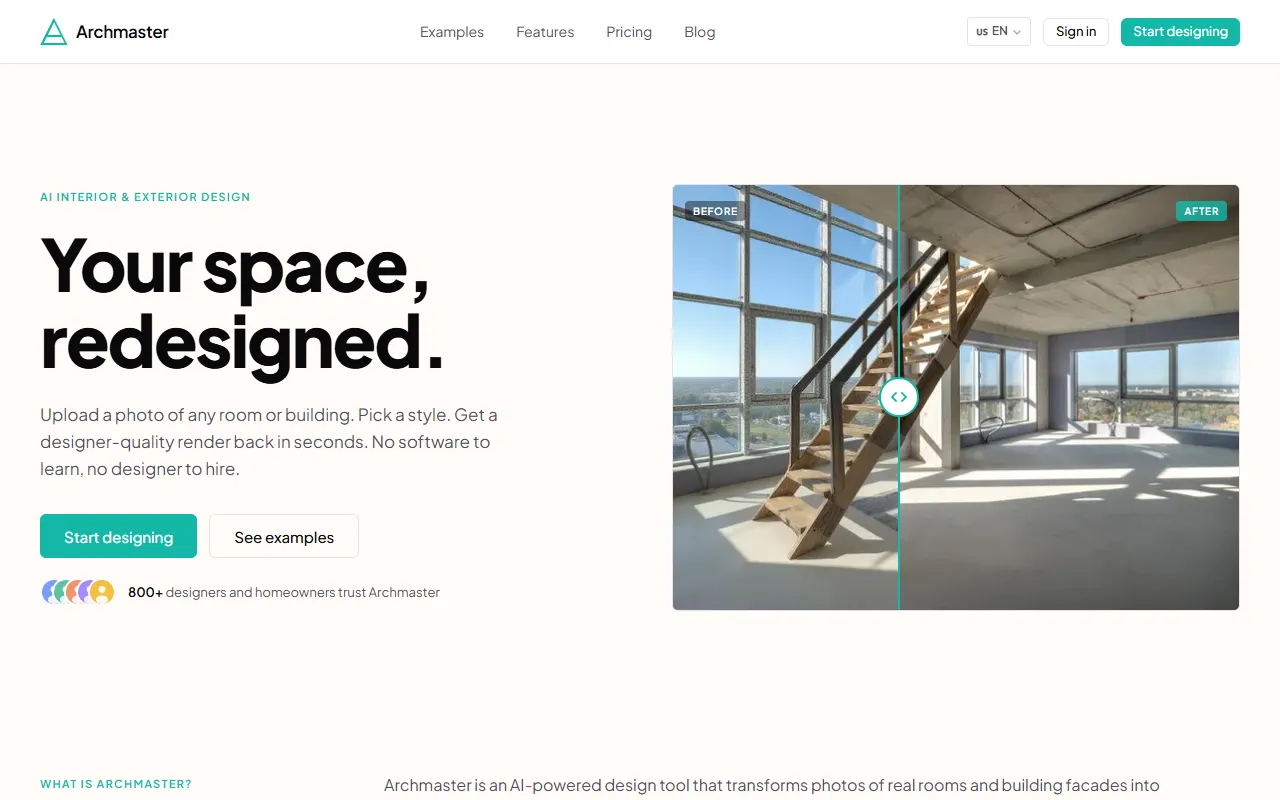
Transform photos of rooms or building facades into stunning, photorealistic redesigns in seconds by selecting from 20 style presets. Ideal for homeowners and designers alike, Archmaster requires no prior design knowledge or software.
archmaster — official website
Imagine you’re a real estate agent scrambling to create virtual staging for a property that’s showing tomorrow. You need photorealistic interior design renders fast, and hiring a designer is out of the question due to the cost and time involved. This is where tools like Archmaster come in handy, offering AI-powered design transformations without the need for specialized software or designers. Archmaster promises to convert your room photos into designer-quality renders in seconds, making it a potential lifesaver when time and budget are tight.
Archmaster excels in transforming interior and exterior photos into photorealistic redesigns. By leveraging its “Interior Redesign” feature, you can upload a photo, select from 20 different style presets, and receive a new render in under a minute. This streamlined process requires no prior design knowledge, making it extremely accessible. Once you’ve uploaded your image, the AI quickly generates a new design that looks as if a professional designer created it, complete with intricate details and realistic textures.
Key Features
- Interior Redesign — Instantly transforms room photos using 20 style presets, perfect for quick client presentations.
- Exterior Redesign — Applies style transformations to building facades, offering versatility for real estate listings.
- Sketch to Image — Converts hand-drawn sketches into photorealistic images, helping visualize early-stage concepts.
- Render Enhancer — Upscales and sharpens outputs for print-ready quality, essential for marketing materials.
- Architecture Video — Creates a video walk-through from still renders, ideal for virtual tours.
Pros & Cons
- ✓ Quick transformation from photo to render in under 60 seconds
- ✓ Offers a diverse range of style presets, from Scandinavian to Cyberpunk
- ✓ No additional software or design expertise required
- ✗ Pricing at $9.99 per week might be steep for those with infrequent needs
- ✗ Limited to 30 credits per week, which may not be enough for larger projects
If you’re an advanced interior designer looking for highly customized renderings, Archmaster might not meet your needs. The tool’s limitations are evident in its reliance on predefined style presets, which may not satisfy users seeking niche or highly tailored design solutions. Furthermore, larger teams requiring high-volume usage may find the 30 credits per week insufficient, leading to increased costs if additional credits are needed.
Compared to tools like SketchUp or AutoCAD, Archmaster offers simplicity and speed but lacks the customizability and depth those platforms provide. SketchUp allows for intricate designs and detailed modeling, making it better suited for professionals with complex requirements. Archmaster, on the other hand, is ideal for quick, style-aligned renderings without the overhead of learning new software. Choose Archmaster if speed and ease of use are your priorities, but opt for SketchUp if detailed, customizable designs are essential.
Best For
Archmaster is ideal for small business owners, such as real estate agents or freelance interior designers, who need to create quick, photorealistic visualizations of spaces. The weekly $9.99 pricing makes it accessible for those who need high-quality renders without committing to a more expensive, long-term software solution.
Archmaster is particularly valuable for real estate agents and small interior design businesses who need fast, professional-quality renders without investing in complex software. The tool’s simplicity and speed make it a practical choice for those who want to impress clients with high-quality designs on short notice. Archmaster is recommended for its affordability and ease of use, making it a smart choice for anyone needing instant design transformations.
This review is based on publicly available information from the tool's official website and is written independently by the theWebrary editorial team. We do not accept payment for review content.
Share
Screenshots


Tool Overview
Latest Featured


Browse More Tools
View all
Planpoint
AI ProductivityCreate interactive stacking plans for real estate properties with Planpoint. Designed for property owners and managers, it offers a user-friendly interface tailored to various sectors. Access is free, making it an accessible choice for all users.

Pawjojo
AI ResearchLog meals, medications, weight, and symptoms for pets with ease, generating trends and vet-ready reports. Designed for dog and cat owners, Pawjojo features an extensive database of over 7,377 pet foods. Free to use with optional paid upgrades.

lora ai Anime LoRA Training
AI Image GenerationGenerate high-quality images and train custom Anime LoRA models for consistent character and manga styles. Designed for creators without design skills, the platform offers 5 free credits to start, with additional paid upgrades available.

mainaro
AI MarketingVisualizes real estate profits after taxes, allowing users to analyze cash flow and exit simulations for their portfolios. Offers a free location analysis for all 16 federal states, with the first property analysis available at no charge.

AI House Plan
AI Image GenerationGenerate detailed floor plans for houses, rooms, offices, and restaurants using prompts or sketches. Ideal for designers and homeowners seeking quick, editable layouts, with free access and optional paid upgrades for enhanced features.

GenImagePro
AI Image GenerationTransform photos into unique AI-generated visuals, styles, and scenes with GenImagePro’s image-to-image functionality. Ideal for artists, marketers, and anyone needing creative variations, it offers free access with optional paid upgrades.
Get Your AI Tool
In Front of Thousands
Join hundreds of AI tools already featured on theWebrary. Get priority placement, a dedicated listing page, and reach an audience actively searching for AI tools.
1 Month
$5
$6
3 Months
$10
Save 50%
12 Months
$20
Save 75%