Flick
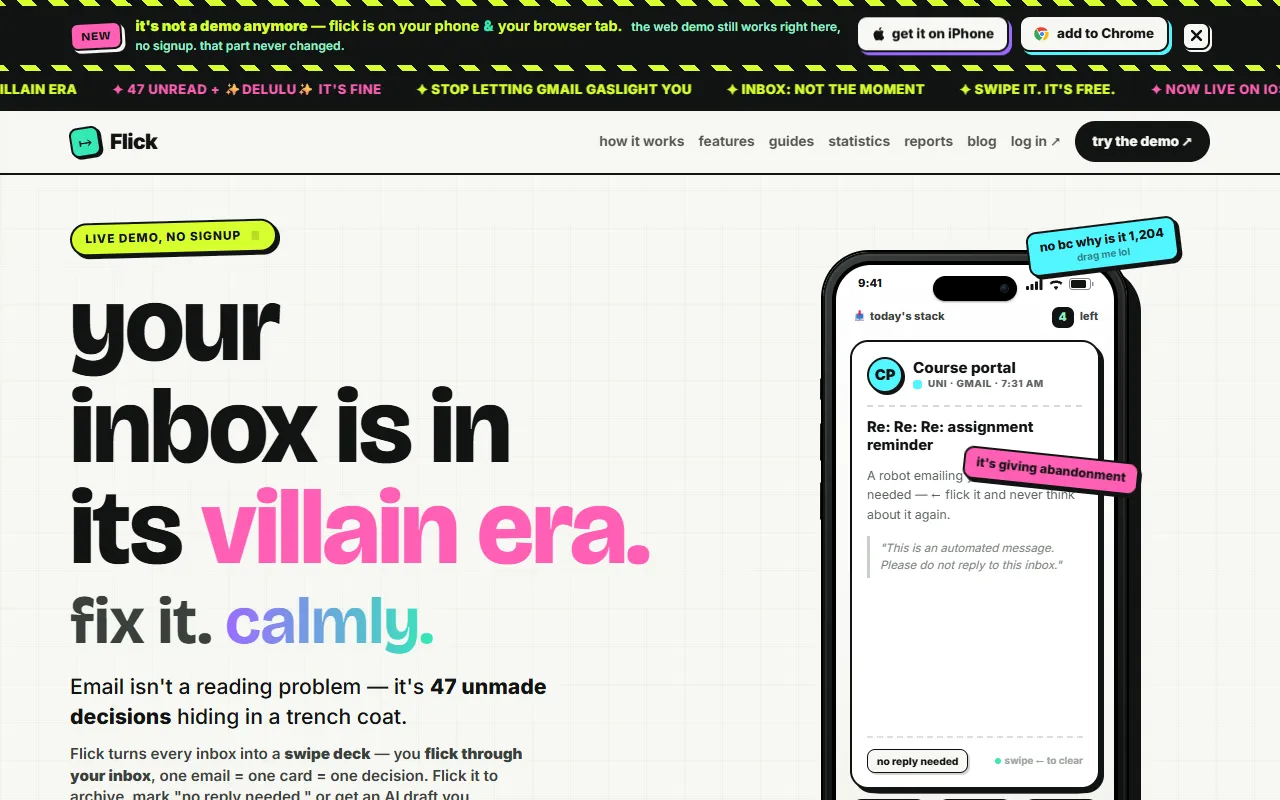
Flick simplifies email management by presenting each message as a card for quick decision-making. Designed for those overwhelmed by their inbox, it offers a swipe-to-decide interface that’s available for free, with options for paid upgrades.
Flick — official website
Imagine you’re a busy professional drowning in a sea of unread emails. Important messages get buried, and you find yourself spending hours trying to manage your inbox, only to fall behind on actual work. In such a scenario, a tool that can streamline email management and help you achieve inbox zero effortlessly is crucial. This is where an app like Flick comes in, offering a unique approach to email triage that promises to transform your chaotic inbox into a manageable task list.
One of Flick’s standout capabilities is its swipe-to-decide workflow. You engage with each email as a card, allowing you to swipe to archive, mark it as “no reply needed,” or approve an AI-generated reply. This simple yet effective method reduces your inbox to a finite deck, ensuring that you only deal with what matters. The result is a clutter-free inbox with decisions made quickly and efficiently. This workflow, based on Flick’s marketing, is designed to help you swiftly process emails without getting bogged down in endless scrolling.
Key Features
- Finite Swipe Deck — Transform your inbox into a swipe deck, making it easy to archive, mark, or draft AI replies for each email.
- One-Click Unsubscribe — Offers a straightforward method to unsubscribe from bulk emails, showing you the result immediately.
- AI Drafted Replies — Generate email replies in your voice with AI assistance, saving time on crafting responses.
- Receipts Not Gamification — Provides session receipts without relying on gamified elements like streaks or leaderboards.
- Free Public Tools — Access tools like the Unsubscribe Checker without an account, ensuring transparency in email management.
Pros & Cons
- ✓ Swiping, archiving, and “no reply needed” are free and unlimited
- ✓ Merges multiple inboxes into one deck in the Pro plan
- ✓ Honest pricing with no data storage on Flick’s servers
- ✗ Free plan limited to 5 AI-drafted replies per month
- ✗ Advanced snooze feature only available in paid plans
Flick may frustrate users who heavily rely on AI-generated replies due to the limited number of drafts in the Free plan. If you manage multiple email accounts and require extensive AI drafting, you might find the Free plan inadequate. Additionally, if you’re accustomed to features like advanced snooze and need them for organizing follow-ups, the cost of upgrading to a paid plan could be a downside, especially for individual users or small startups with tight budgets.
When considering alternatives, another option like Superhuman might appeal to users needing advanced email productivity features and integrated calendar management, albeit at a higher cost. Flick is a better fit for those focused on efficient email triage with a simple swipe-based interface. However, if you need a more comprehensive email management solution with robust integrations and more AI drafting options, Superhuman might be worth the investment despite its premium pricing.
Best For
Flick is ideal for individual professionals or small teams looking to streamline email management without breaking the bank. The Free plan is perfect for those focused on quick email triage, while the Pro plan suits users with multiple inboxes and a higher need for AI-generated replies. Its honest pricing and focus on core functionalities make Flick a strong choice for users seeking simplicity.
Flick offers a refreshing approach to email management. With its swipe-to-decide workflow and honest pricing model, it’s well-suited for busy professionals seeking an efficient way to achieve inbox zero. If you’re looking for a tool that simplifies decision-making in your inbox and doesn’t bombard you with unnecessary gimmicks, Flick is worth considering.
This review is based on publicly available information from the tool's official website and is written independently by the theWebrary editorial team. We do not accept payment for review content.
Share
Screenshots


Tool Overview
Latest Featured


Browse More Tools
View all
Planpoint
AI ProductivityCreate interactive stacking plans for real estate properties with Planpoint. Designed for property owners and managers, it offers a user-friendly interface tailored to various sectors. Access is free, making it an accessible choice for all users.

Pawjojo
AI ResearchLog meals, medications, weight, and symptoms for pets with ease, generating trends and vet-ready reports. Designed for dog and cat owners, Pawjojo features an extensive database of over 7,377 pet foods. Free to use with optional paid upgrades.

lora ai Anime LoRA Training
AI Image GenerationGenerate high-quality images and train custom Anime LoRA models for consistent character and manga styles. Designed for creators without design skills, the platform offers 5 free credits to start, with additional paid upgrades available.

mainaro
AI MarketingVisualizes real estate profits after taxes, allowing users to analyze cash flow and exit simulations for their portfolios. Offers a free location analysis for all 16 federal states, with the first property analysis available at no charge.

AI House Plan
AI Image GenerationGenerate detailed floor plans for houses, rooms, offices, and restaurants using prompts or sketches. Ideal for designers and homeowners seeking quick, editable layouts, with free access and optional paid upgrades for enhanced features.

GenImagePro
AI Image GenerationTransform photos into unique AI-generated visuals, styles, and scenes with GenImagePro’s image-to-image functionality. Ideal for artists, marketers, and anyone needing creative variations, it offers free access with optional paid upgrades.
Get Your AI Tool
In Front of Thousands
Join hundreds of AI tools already featured on theWebrary. Get priority placement, a dedicated listing page, and reach an audience actively searching for AI tools.
1 Month
$5
$6
3 Months
$10
Save 50%
12 Months
$20
Save 75%