Revisehttps://revise.io
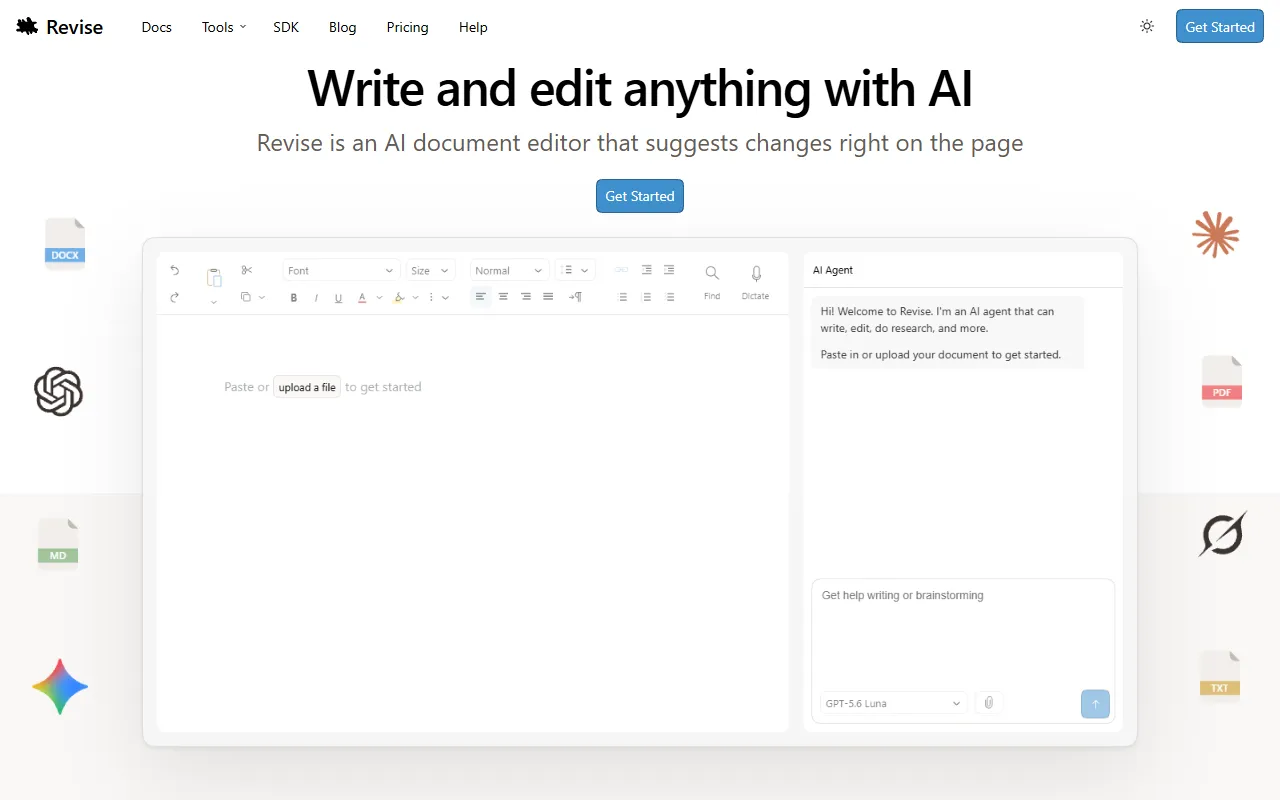
Revise offers an AI document editing experience that enables users to import, edit, and review Word files directly in their browser. With tracked changes and suggestions from AI models like GPT and Claude, it is designed for anyone looking to refine their writing efficiently. The basic service is free, with options for paid upgrades.
Revisehttps://revise.io — official website
Imagine you’re a legal professional facing a tight deadline to draft and refine a complex contract. Time is ticking, and the pressure to ensure accuracy and clarity is immense. You need a tool that not only allows collaborative editing but also suggests precise improvements with a focus on document layout and formatting. This is where an AI-powered document editor can step in, helping you meet your deadline by providing real-time suggestions and maintaining the integrity of your document’s structure.
Revise offers a seamless workflow for those needing an AI-assisted document editor. You can upload a DOCX file, and the AI agent takes over, making suggestions directly on the document. You have the control to accept or reject each change. The tracked changes feature ensures you can see exactly what the AI modifies, making it easier to review and finalize your document. This process is ideal for large, complex documents where every change needs to be meticulously tracked and reviewed.
Key Features
- AI Document Editing — Suggests real-time changes directly in your document, ensuring accuracy and clarity.
- Tracked Changes — Keeps a record of AI edits, allowing for easy review and acceptance.
- Multiple AI Models — Use models like GPT-5.6 and Claude for diverse editing approaches.
- Real-Time Collaboration — Edit documents live with others, combining human and AI input effectively.
- Document Format Compatibility — Supports DOCX, PDF, Markdown, and more, maintaining layout and formatting.
Pros & Cons
- ✓ Real-time collaboration allows multiple users to work on a document simultaneously.
- ✓ Offers a variety of AI models, including GPT-5.6, Claude, and Google Gemini.
- ✓ Free tier available with a daily allowance for AI usage, making it accessible for light users.
- ✗ The website doesn’t specify exact AI usage limits for the free plan, which may be restrictive for heavy users.
- ✗ Lack of specific pricing details for paid plans makes it hard to budget for higher usage needs.
Revise might not be ideal for users who need a tool primarily for offline use or who rely heavily on advanced data handling tools, as it runs entirely in your browser. Those who need extensive offline capabilities or deep integration with other offline software might find Revise’s online-only nature limiting. Additionally, those with high-volume, AI-intensive needs might find the unspecified limits of the free plan constraining.
For someone considering alternatives, Google Docs might be appealing for its integration with other Google services and offline capabilities. Conversely, Microsoft Word offers robust offline functionality and a variety of templates, though without AI editing. Choose Revise if you need integrated AI editing and real-time collaboration, and are primarily working online, as it combines these two features effectively unlike the other two.
Best For
Revise is ideal for small to medium-sized teams or solo professionals who need a robust online word processor that incorporates AI for document editing. It’s particularly useful for legal, technical, or academic writing where document integrity and precise language are critical. The free tier makes it accessible for those with limited AI needs but might require upgrading for heavier usage.
Revise is a solid choice for anyone needing an AI-powered document editor that tracks changes and supports real-time collaboration. If you often work with complex documents requiring precise language and formatting, and primarily work online, this tool is worth considering. Revise combines powerful AI editing with user control, making it a valuable addition to any professional’s toolkit.
This review is based on publicly available information from the tool's official website and is written independently by the theWebrary editorial team. We do not accept payment for review content.
Share
Screenshots


Tool Overview
Latest Featured


Browse More Tools
View all
Planpoint
AI ProductivityCreate interactive stacking plans for real estate properties with Planpoint. Designed for property owners and managers, it offers a user-friendly interface tailored to various sectors. Access is free, making it an accessible choice for all users.

Pawjojo
AI ResearchLog meals, medications, weight, and symptoms for pets with ease, generating trends and vet-ready reports. Designed for dog and cat owners, Pawjojo features an extensive database of over 7,377 pet foods. Free to use with optional paid upgrades.

lora ai Anime LoRA Training
AI Image GenerationGenerate high-quality images and train custom Anime LoRA models for consistent character and manga styles. Designed for creators without design skills, the platform offers 5 free credits to start, with additional paid upgrades available.

mainaro
AI MarketingVisualizes real estate profits after taxes, allowing users to analyze cash flow and exit simulations for their portfolios. Offers a free location analysis for all 16 federal states, with the first property analysis available at no charge.

AI House Plan
AI Image GenerationGenerate detailed floor plans for houses, rooms, offices, and restaurants using prompts or sketches. Ideal for designers and homeowners seeking quick, editable layouts, with free access and optional paid upgrades for enhanced features.

GenImagePro
AI Image GenerationTransform photos into unique AI-generated visuals, styles, and scenes with GenImagePro’s image-to-image functionality. Ideal for artists, marketers, and anyone needing creative variations, it offers free access with optional paid upgrades.
Get Your AI Tool
In Front of Thousands
Join hundreds of AI tools already featured on theWebrary. Get priority placement, a dedicated listing page, and reach an audience actively searching for AI tools.
1 Month
$5
$6
3 Months
$10
Save 50%
12 Months
$20
Save 75%