AI Video Generation
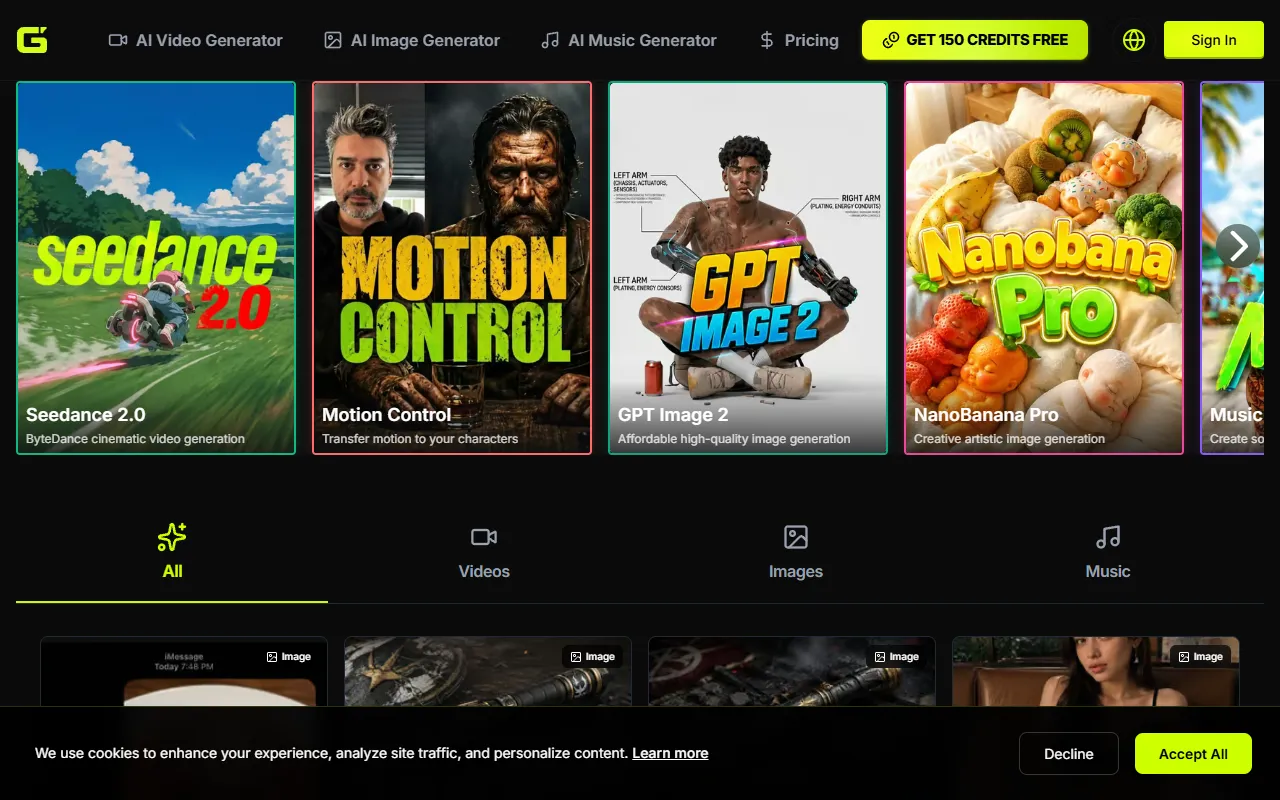
Generate high-quality videos, images, and music using advanced AI models. Ideal for creators seeking watermark-free content, this service offers free credits to get started without requiring a credit card.
AI Video Generation — official website
Imagine you’re a content creator tasked with producing a high-quality video series on a tight deadline. You’re juggling multiple projects and need a tool that can streamline video production without sacrificing quality. You’re looking for an AI-driven solution that can handle not just videos, but also images and music, cutting down on the time you spend on each individual piece. With AI Video Generation, you have the potential to meet your deadline efficiently and with polished results, thanks to its range of AI models and features.
AI Video Generation excels in creating high-definition videos, images, and music using various AI models. According to the tool’s website, it provides access to models like Seedance 2.0 for cinematic video generation and Kling 3.0 for advanced video capabilities. Users can generate content quickly without the hassle of watermarks, which is particularly beneficial for professional creators. Start by selecting the type of media you need—be it video, image, or music—and choose the appropriate AI model. The platform immediately processes your request, allowing you to download the output in high quality. The tool’s marketing highlights its ability to deliver content efficiently and without compromising on quality.
Key Features
- Seedance 2.0 — Offers cinematic video generation, crucial for professional video production.
- Kling 3.0 — Provides fast and advanced video generation, supporting high-volume workflows.
- Veo 3.1 — Specializes in high-quality cinematic video creation, ideal for storytelling.
- GPT Image 2 — Ensures affordable high-quality image generation, beneficial for budget-conscious projects.
- Music AI — Allows for the creation of songs with AI, expanding creative possibilities for multimedia projects.
Pros & Cons
- ✓ No watermarks on generated content, enhancing professionalism.
- ✓ Access to a wide range of AI models, offering versatility in content creation.
- ✓ Priority processing available for higher-tier plans, reducing wait times.
- ✗ Credits consume quickly with premium models, potentially costly for frequent users.
- ✗ Some features may be locked behind higher pricing tiers, limiting access for budget users.
For a freelance graphic designer focusing solely on image projects, AI Video Generation may not be the optimal choice. The tool prominently features video and music generation capabilities, which might overshadow the image generation component. If you require detailed control over image edits or need specialized features such as vector graphics support, this tool’s offerings might feel limited. The focus on multimedia makes it more suitable for holistic content projects rather than specialized, image-centric tasks.
When comparing AI Video Generation with a tool like Synthesia, which specializes in AI video avatars, the choice hinges on your specific needs. If your focus is on creating diverse multimedia content with high flexibility, AI Video Generation is the more comprehensive choice. However, if your primary interest lies in producing AI-driven video presentations with human-like avatars, Synthesia would serve you better. It’s crucial to align your tool choice with your content priorities and project scope.
Best For
AI Video Generation is best for small-to-medium-sized creative agencies or independent content creators who need to produce a broad spectrum of video, image, and music content. The flexible pricing model supports both occasional users and high-volume creators, making it adaptable to various project scales and budgets.
AI Video Generation stands out for its range of AI models and watermark-free outputs, catering to creators who prioritize quality and efficiency. It’s particularly valuable for users looking to generate diverse multimedia content without incurring significant costs. AI Video Generation is recommended for professional creators who need versatile tools to meet high-quality standards across different media forms.
This review is based on publicly available information from the tool's official website and is written independently by the theWebrary editorial team. We do not accept payment for review content.
Share
Screenshots


Tool Overview
Latest Featured


Browse More Tools
View all
Time Overlay
AI Image GenerationGenerate transparent countdown timer overlays for video editing projects with Time Overlay. This tool allows users to customize duration, style, and position before exporting in formats like PNG or WebM. It’s available for free, making it accessible for content creators and editors.

Yume Comic
AI Image GenerationCreate manga, webtoons, and cartoon panels from text or images in just seconds. Ideal for storytellers without drawing skills, Yume Comic enables users to bring their ideas to life with a free tier and optional paid upgrades.

Hubfluence
AI MarketingAutomates outreach and management for TikTok Shop brands and agencies by connecting them with creators to drive sales. Users can access a database of over 4 million creators to find the best partnerships. Free to start with options for paid upgrades.

Combos AI: Turn Text into Gmae with AI Free Online – No coding & No Sign-up
AI ProductivityTurn text into games effortlessly with Combos, an AI-driven platform for game development. Designed for creators of all skill levels, it requires no coding or sign-up, making game creation accessible and free.

Instagram Email Scraper
AI Customer SupportExtracts emails and phone numbers from Instagram followers and those followed, exporting the data to Excel or CSV formats with a single click. Ideal for businesses looking to enhance their outreach efforts. Free to use with options for paid upgrades.

CustomTattoo AI
AI Image GenerationGenerate unique tattoo designs and visualize them on your own skin before getting inked. Ideal for anyone considering a tattoo, it offers 3 free credits to start, with additional paid upgrades available.
Get Your AI Tool
In Front of Thousands
Join hundreds of AI tools already featured on theWebrary. Get priority placement, a dedicated listing page, and reach an audience actively searching for AI tools.
1 Month
$5
$6
3 Months
$10
Save 50%
12 Months
$20
Save 75%