Creatii AI
Create stunning AI videos and images for social media posts, ads, and brand content using advanced models. Designed for marketers and creators, Creatii AI offers free access with paid upgrades for enhanced features.
Creatii AI — official website
Imagine you’re a social media manager at a mid-sized company. You’re tasked with creating engaging video content for multiple platforms, but you’re feeling overwhelmed with the time-intensive process of video editing and image generation. You need a tool that can streamline the process, delivering high-quality, polished videos and images quickly. Discovering a tool that combines video and image creation capabilities in one studio could significantly ease your workload and help you meet deadlines without compromising on quality.
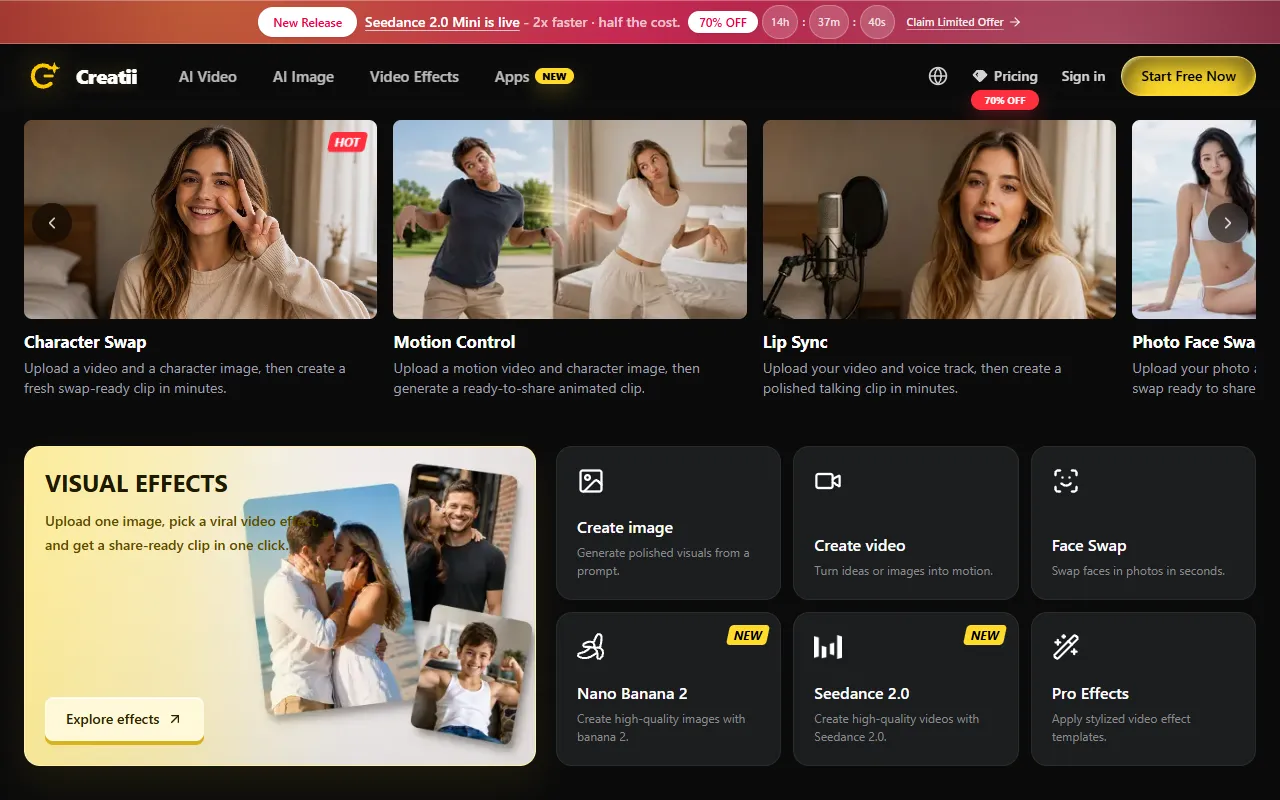
Creatii AI excels with its “Character Swap” feature. You upload a video and a character image, and it swiftly generates a new clip ready for sharing. This tool is particularly useful for content creators who need to produce fresh, engaging videos without starting from scratch every time. It’s a straightforward workflow: feed in your existing content and choose the new character, and within minutes, you have a reinvented clip that fits perfectly for social media or advertising. Based on Creatii AI’s own marketing, this feature is a standout for those seeking efficiency in their creative process.
Key Features
- Character Swap — Quickly create new video content by swapping characters, perfect for fresh social media posts.
- Motion Control — Generate animated clips from motion videos and character images, enhancing dynamic content creation.
- GPT Image 2 — Browse and utilize community image presets, allowing for quick and diverse image generation.
- Face Swap — Swap faces in photos in seconds, ideal for creating fun and engaging visual content.
Pros & Cons
- ✓ Offers a variety of specialized AI models for both video and image creation.
- ✓ Includes a commercial license, allowing for professional use without extra costs.
- ✓ Provides early access to advanced AI features for Pro and Max plan users.
- ✗ Credits do not roll over monthly, requiring careful planning to maximize their use.
- ✗ The tool may not be suitable for high-volume creators without the Max plan due to credit restrictions.
If you’re a high-output creator who needs to generate large volumes of content regularly, Creatii AI might not be the best fit without investing in the Max plan. The credit system resets monthly, so unused credits are lost, making it essential to utilize them fully within the billing cycle. This could be frustrating if your workload fluctuates, as you might find yourself needing more credits in busy months.
Compared to alternatives like Canva Pro and Adobe Express, Creatii AI offers more niche video and image generation features like Character Swap and Motion Control. However, Canva and Adobe offer broader design and editing capabilities that might fit better for generalist needs. Choose Creatii AI if you prioritize AI-generated video content, but consider the others for more varied design tasks.
Best For
Creatii AI is ideal for digital content creators, particularly those working in social media or advertising, who need to produce engaging video and image content quickly. Small to medium-sized teams or freelancers will find the Basic or Pro plan affordable and sufficient for regular content needs, while high-output creators might consider the Max plan for more extensive use.
Creatii AI serves as a useful tool for content creators needing quick, polished videos and images. It’s well-suited for those who prioritize AI-driven content creation and can manage within the constraints of the credit system. Creatii AI is worth considering for social media managers or digital marketers focused on producing visually compelling content efficiently. If that sounds like you, it’s a tool to seriously consider.
This review is based on publicly available information from the tool's official website and is written independently by the theWebrary editorial team. We do not accept payment for review content.
Share
Screenshots


Tool Overview
Latest Featured


Browse More Tools
View all
Planpoint
AI ProductivityCreate interactive stacking plans for real estate properties with Planpoint. Designed for property owners and managers, it offers a user-friendly interface tailored to various sectors. Access is free, making it an accessible choice for all users.

Pawjojo
AI ResearchLog meals, medications, weight, and symptoms for pets with ease, generating trends and vet-ready reports. Designed for dog and cat owners, Pawjojo features an extensive database of over 7,377 pet foods. Free to use with optional paid upgrades.

lora ai Anime LoRA Training
AI Image GenerationGenerate high-quality images and train custom Anime LoRA models for consistent character and manga styles. Designed for creators without design skills, the platform offers 5 free credits to start, with additional paid upgrades available.

mainaro
AI MarketingVisualizes real estate profits after taxes, allowing users to analyze cash flow and exit simulations for their portfolios. Offers a free location analysis for all 16 federal states, with the first property analysis available at no charge.

AI House Plan
AI Image GenerationGenerate detailed floor plans for houses, rooms, offices, and restaurants using prompts or sketches. Ideal for designers and homeowners seeking quick, editable layouts, with free access and optional paid upgrades for enhanced features.

GenImagePro
AI Image GenerationTransform photos into unique AI-generated visuals, styles, and scenes with GenImagePro’s image-to-image functionality. Ideal for artists, marketers, and anyone needing creative variations, it offers free access with optional paid upgrades.
Get Your AI Tool
In Front of Thousands
Join hundreds of AI tools already featured on theWebrary. Get priority placement, a dedicated listing page, and reach an audience actively searching for AI tools.
1 Month
$5
$6
3 Months
$10
Save 50%
12 Months
$20
Save 75%