Storyloft
Facilitates writing and publishing with integrated AI assistance for various content types. Designed for authors and marketers seeking efficient content creation. Free to use with options for paid upgrades.
Storyloft — official website
Imagine you’re an author juggling multiple tools to draft, format, and publish your book. You draft in Google Docs, use Canva for illustrations, and hire someone to format it for print. This disjointed process is not only time-consuming but also prone to errors and inconsistencies. As deadlines loom, you realize you need a more integrated solution. That’s when you start searching for an all-in-one platform that can handle writing, illustrating, and publishing without switching between apps and losing momentum.
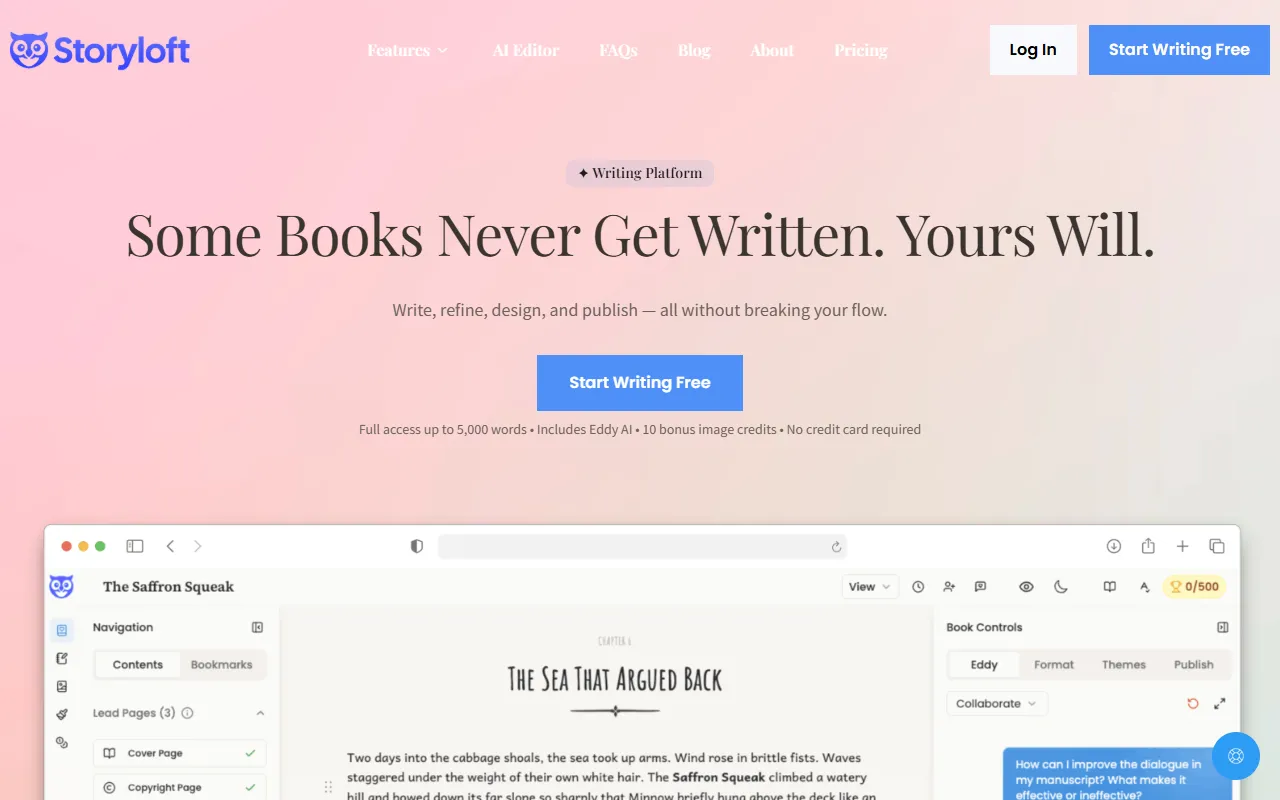
Storyloft excels at integrating different stages of book creation into one unified workflow. One standout feature is its AI-powered book writing editor. You draft your manuscript directly in this editor, where the AI assistant, Eddy, provides real-time feedback on plot, character development, and more. You input your text, and Eddy helps refine it, ensuring professional quality. This seamless integration allows you to maintain your writing flow without jumping between platforms. The features discussed here are based on Storyloft’s own marketing materials.
Key Features
- AI Writing Assistant (Eddy) — Provides real-time feedback on plot and character development, making it easier to refine your writing.
- Book Editor — A dedicated space to write your manuscript with tools like focus mode and tone analysis.
- Illustration Suite — Allows you to create consistent character art and scenes directly tied to your manuscript.
- Book Cover Studio — Generates book covers that match your book’s style and imagery.
- Print-Ready Export — Exports your manuscript for print and ebook formats without needing another tool.
Pros & Cons
- ✓ Comprehensive integration of writing, illustrating, and publishing in one platform
- ✓ AI editor provides contextualized, real-time feedback
- ✓ Consistent visual identity with integrated illustration and cover design tools
- ✗ Website doesn’t specify detailed pricing, making it difficult to assess cost-effectiveness
- ✗ Might not be suitable for users who require advanced typesetting features found in professional publishing software
While Storyloft offers a robust suite of tools for authors, it might fall short for those looking for advanced typesetting capabilities. Professional publishers or authors who need intricate layout options might find the platform limiting, as Storyloft focuses more on integrating basic writing and design tasks. Moreover, the lack of detailed pricing information may frustrate budget-conscious users who need to plan expenses carefully.
If you’re considering alternatives, Scrivener is well-regarded for its organizational features, though it lacks the integrated AI and design tools Storyloft offers. Meanwhile, Atticus focuses on formatting but doesn’t provide the full creative suite that Storyloft does. For authors looking for an all-in-one solution, Storyloft is a strong choice. However, if your primary need is advanced formatting or organization, the other tools may better suit your needs.
Best For
Storyloft is ideal for independent authors or small publishers seeking an all-in-one solution to manage the entire book creation process. Its AI-assisted writing tools and integrated design features make it particularly suitable for those writing fiction or narrative non-fiction. The platform’s free plan with optional paid upgrades allows users to start without financial commitment, making it accessible for budget-conscious creatives.
Storyloft stands out for authors who want a unified platform to write, illustrate, and publish without the typical fragmented workflow. Its integration of various tools into one seamless experience is particularly valuable for indie authors and small publishers looking to streamline their book production process. If you value real-time AI feedback and cohesive design capabilities, Storyloft is worth considering.
This review is based on publicly available information from the tool's official website and is written independently by the theWebrary editorial team. We do not accept payment for review content.
Share
Tool Overview
Latest Featured


Browse More Tools
View all
Time Overlay
AI Image GenerationGenerate transparent countdown timer overlays for video editing projects with Time Overlay. This tool allows users to customize duration, style, and position before exporting in formats like PNG or WebM. It’s available for free, making it accessible for content creators and editors.

Yume Comic
AI Image GenerationCreate manga, webtoons, and cartoon panels from text or images in just seconds. Ideal for storytellers without drawing skills, Yume Comic enables users to bring their ideas to life with a free tier and optional paid upgrades.

Hubfluence
AI MarketingAutomates outreach and management for TikTok Shop brands and agencies by connecting them with creators to drive sales. Users can access a database of over 4 million creators to find the best partnerships. Free to start with options for paid upgrades.

Combos AI: Turn Text into Gmae with AI Free Online – No coding & No Sign-up
AI ProductivityTurn text into games effortlessly with Combos, an AI-driven platform for game development. Designed for creators of all skill levels, it requires no coding or sign-up, making game creation accessible and free.

Instagram Email Scraper
AI Customer SupportExtracts emails and phone numbers from Instagram followers and those followed, exporting the data to Excel or CSV formats with a single click. Ideal for businesses looking to enhance their outreach efforts. Free to use with options for paid upgrades.

CustomTattoo AI
AI Image GenerationGenerate unique tattoo designs and visualize them on your own skin before getting inked. Ideal for anyone considering a tattoo, it offers 3 free credits to start, with additional paid upgrades available.
Get Your AI Tool
In Front of Thousands
Join hundreds of AI tools already featured on theWebrary. Get priority placement, a dedicated listing page, and reach an audience actively searching for AI tools.
1 Month
$5
$6
3 Months
$10
Save 50%
12 Months
$20
Save 75%